



Dashboard
Active time, tracked-time ring, deep-focus count, top apps and session cards — your whole day on one screen.
Private time tracker for Mac & Windows
DeskRewind tracks your day automatically — active, idle and locked time, the apps you were in, and a screenshot timelapse you can scrub — and keeps every byte of it on your own machine. No account. No cloud. No timers to start.
Free 7-day trial · no card, no account macOS · Apple Silicon Also on Windows
How it works
Most time trackers fail because you forget to press start. DeskRewind never asks you to — install it once and the day records itself.
Download, grant screen recording, and DeskRewind sits quietly in the menu bar or tray. Nothing to start, nothing to stop.
It detects active, idle and locked time on its own, notes which app you were in, and captures a screenshot every 30 seconds.
Open the dashboard and see 6h 30m active, the app lanes, the deep-focus stretch — then scrub the timelapse to any moment.
Features
From focus blocks to a rewindable timelapse: track the day, name the task you were on, journal it, and pull task lists from your own AI — without sending anything to a server.
Active time, tracked-time ring, deep-focus count, top apps and session cards — your whole day on one screen.
Hour-by-hour blocks with per-app lanes, a deep-focus bracket, meetings you mark by hand, and week, month and year heatmaps.
A cinematic stage with timecode, app filter pills, playback up to 60×, multi-display frames and MP4 export.
Screenshots pinned to the day ribbon. Click any block to jump back to exactly what was on screen.
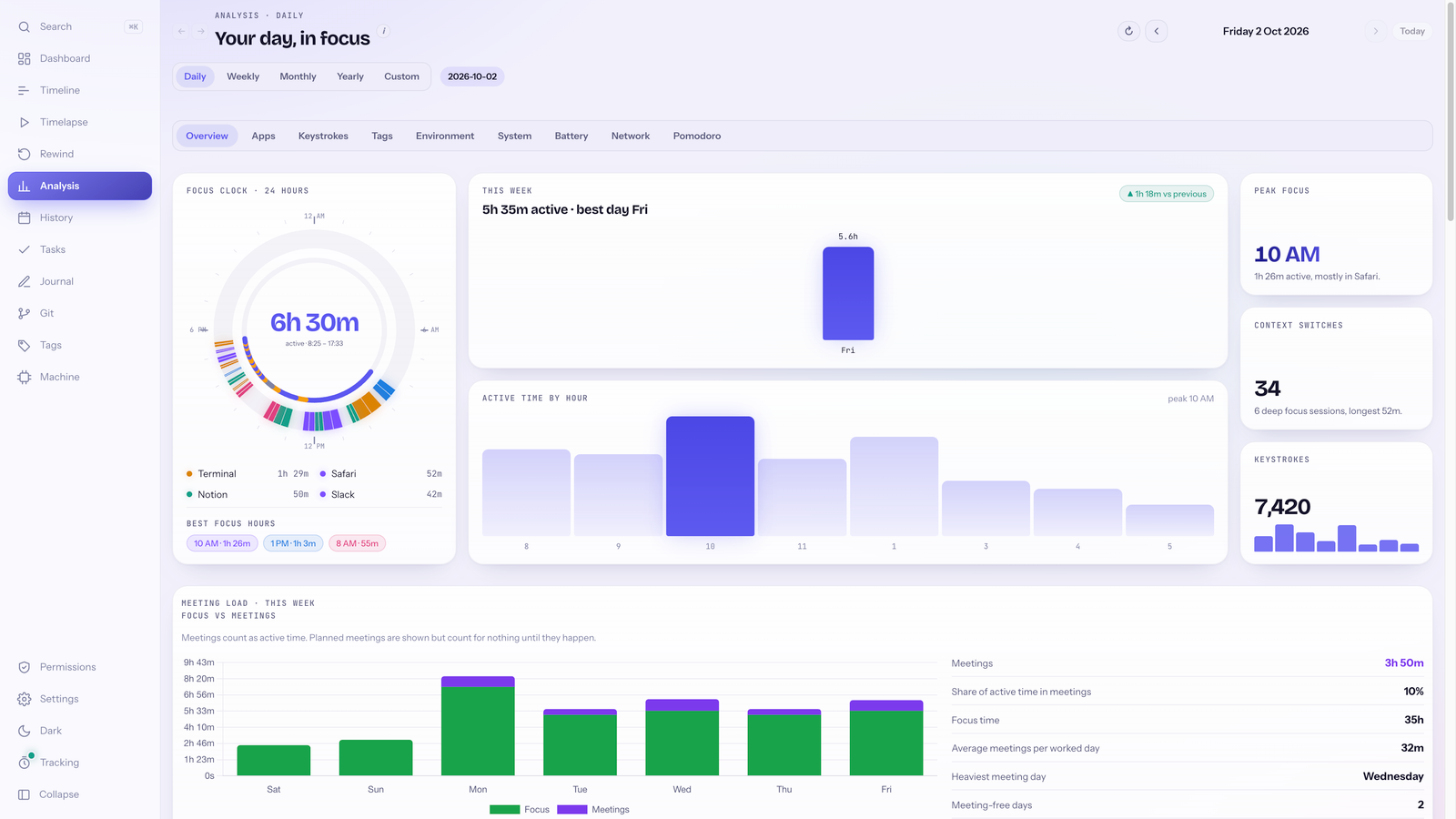
24-hour focus clock, week trend, hourly bars and insight cards. Optional battery, network and environment modules.
Intentions and reflections beside the work you actually did, scaffolded from blocks, apps and commits. Autosaves as you type.
Pin what you are working on and new blocks inherit it. A board with groups, priority, due dates and tracked time per task.
Copy a prompt with the JSON schema into ChatGPT, Claude or Cursor, paste the result back, preview and import. DeskRewind never calls a model.
Import local repos for contribution heatmaps, commit and file history, and contributor stats — read locally, nothing fetched.
Built for
DeskRewind is a personal tool for the person at the keyboard. There is no team view, no admin, and no way to see anyone else's day.
Proof of a focused day and a private record of where the afternoon went — without a client-visible dashboard.
See deep work versus Slack and email, honestly. Weekly and monthly views show whether the ship week was really a ship week.
No account, no browser extension phoning home, no upload. A local-first tool you can audit in a folder on disk.
Privacy
Your work memory lives in a folder on your disk and never leaves your machine. Use DeskRewind offline; when you are online it only checks your license and looks for updates. Read the full Privacy Policy.
| Feature |  DeskRewind DeskRewind | Cloud time trackers |
|---|---|---|
| Where your data lives | A folder on your disk | Their servers |
| Account required | None | Yes, plus a team admin |
| Screenshots | Local timelapse you can scrub | Uploaded, or not offered |
| Pricing | Pay once, $29.99 USD | Monthly per seat |
| Built for | The person at the keyboard | Whoever is watching |
Screenshots
Real screens from the app in Daylight — flip the theme toggle in the header to see the other one.
Active time with a tracked-time ring, deep-focus count, top apps, and the Rewind strip of screenshots pinned to your day.

Per-app lanes with a deep-focus bracket and a day-mix card — hour by hour.

Month compare on the timeline — activity intensity as a day-by-day heatmap so patterns jump out.

Cinematic timelapse stage with timecode, app filter pills, playback speeds, and CPU, memory, battery and network gauges.

24-hour focus clock, week trend, hourly bars and insight cards across day, week, month and year.
Task board with groups, priority, due dates and tracked time — generate lists with your own AI, then paste JSON to import.

Daily reflection beside the work you actually did, with a rendered preview of the entry.

Pricing
Try every feature free for 7 days, then buy a perpetual license once. Your work memory stays on this machine either way — it never depends on an account.
$0for 7 days
Full features · No card · No account
$29.99 USDonce
Yours forever on this device · No renewals
USD list price for a perpetual license; checkout may show tax or regional adjustments. Not a subscription. Most cloud time trackers charge per seat, every month.
FAQ
Something missing? Email deskrewindapp@gmail.com and a human will reply.
DeskRewind is a private, automatic time tracker for Mac and Windows. It records active, idle and locked time, captures a screenshot timelapse you can scrub, and adds a daily journal, named tasks, tags, Git analytics and analysis charts — all stored on your own machine.
No. Your activity, screenshots, journal, tasks and exports stay on your computer — DeskRewind does not upload your work memory. You can use the app without internet access. When online, it checks your license key with Lemon Squeezy and checks GitHub Releases for updates, which you choose whether to install.
No. Active and idle time are detected automatically and screenshots are captured on an interval, so the timeline fills itself. Naming the task you are on, adding comments and tagging blocks are optional — the more you add, the richer the analysis and journal scaffolds become.
Mark them yourself: drag across the timeline or enter a start and end time, with an optional comment. Idle, locked or untracked time inside a meeting counts as active, and Analysis shows focus time next to meeting time. Unmarking restores exactly what was recorded. You can plan upcoming meetings too; they only count once they happen. Nothing is imported from your calendar.
No. DeskRewind does not record keystrokes, mouse clicks, mouse movement or scrolling. Idle time comes from the operating system’s own idle timer.
Yes, using your own AI. DeskRewind does not call a model or send anything to a cloud AI. It builds a prompt with the task JSON schema; you paste that into ChatGPT, Claude, Cursor or any tool you already use, then paste the JSON back to preview and import. Nothing leaves your machine unless you choose to paste it into your AI tool.
Screenshots are compressed JPEGs captured every 30 seconds by default. You can change the interval and quality, exclude apps, and prune or delete frames from the Storage screen at any time. A typical working day stays well under 100 MB.
No. DeskRewind is built for personal use on your own machine — freelancers, makers and privacy-minded knowledge workers. There is no admin dashboard, no team view and no remote access. It is not employee monitoring software.
DeskRewind starts with a free 7-day trial — full features, no card and no account required. After that it is a one-time $29.99 USD purchase for a perpetual license on your machine. No subscription, and your data never depends on an account.
Windows 10 and 11 (x64) and macOS on Apple Silicon (M-series). Intel Macs are not supported. Installers ship on GitHub Releases; on Mac, grant Screen Recording after install and relaunch the app.
Download
Install DeskRewind now and by the end of the day you will have your first timeline to scrub. Full features free for 7 days, then $29.99 USD once. No account, ever.